Prices checked November 2026 on official vendor pages. No sponsored listings — rankings on merit. How we review: https://smartrisehq.com/how-we-review-ai-tools/
60-second pick: Closed question — the answer must come from these sources and nothing else → NotebookLM (now Gemini Notebook). Open question — reason beyond your sources and make something new → Claude. Doing serious research every week → run both: NotebookLM for the evidence, Claude Projects for the draft.
Hands-on test: NotebookLM tested 9 November 2026 (free tier) — real screenshots below. Claude is research-based: no Claude account could be created.
Hands-on test: NotebookLM
We tested NotebookLM ourselves on 9 November 2026, on the free tier, with a Google account created for testing. We made a notebook called “SmartRiseHQ test – Bicycles”, uploaded three short source documents we wrote for the test (a history of the bicycle, types of bicycles, and cycling safety basics), and asked it three questions. Claude was not tested hands-on: no Claude account could be created (Cloudflare’s human-verification loop blocks sign-up from our system), so everything about Claude in this comparison stays research-based.
- Citations work as promised. Asked when John Kemp Starley introduced the Rover safety bicycle and how it differed from the penny-farthing, NotebookLM answered correctly — 1885, two wheels of equal size, chain driving the rear wheel, low frame — with clickable numbered citations pointing into the source document.
- It does not invent what the sources do not say. Asked for the current price of a Rover safety bicycle, it answered that the sources contain no pricing information, and offered to do web research instead. No price was invented.
- Summaries stay inside the sources. Asked to summarise the three sources in five bullet points, it returned exactly five, with citations across all three sources and no outside facts.
- Audio Overview works on the free tier. It generated a 23-minute 38-second “Deep dive” discussion, “From Boneshakers to the Modern Bicycle”, in about ten minutes, and playback worked.
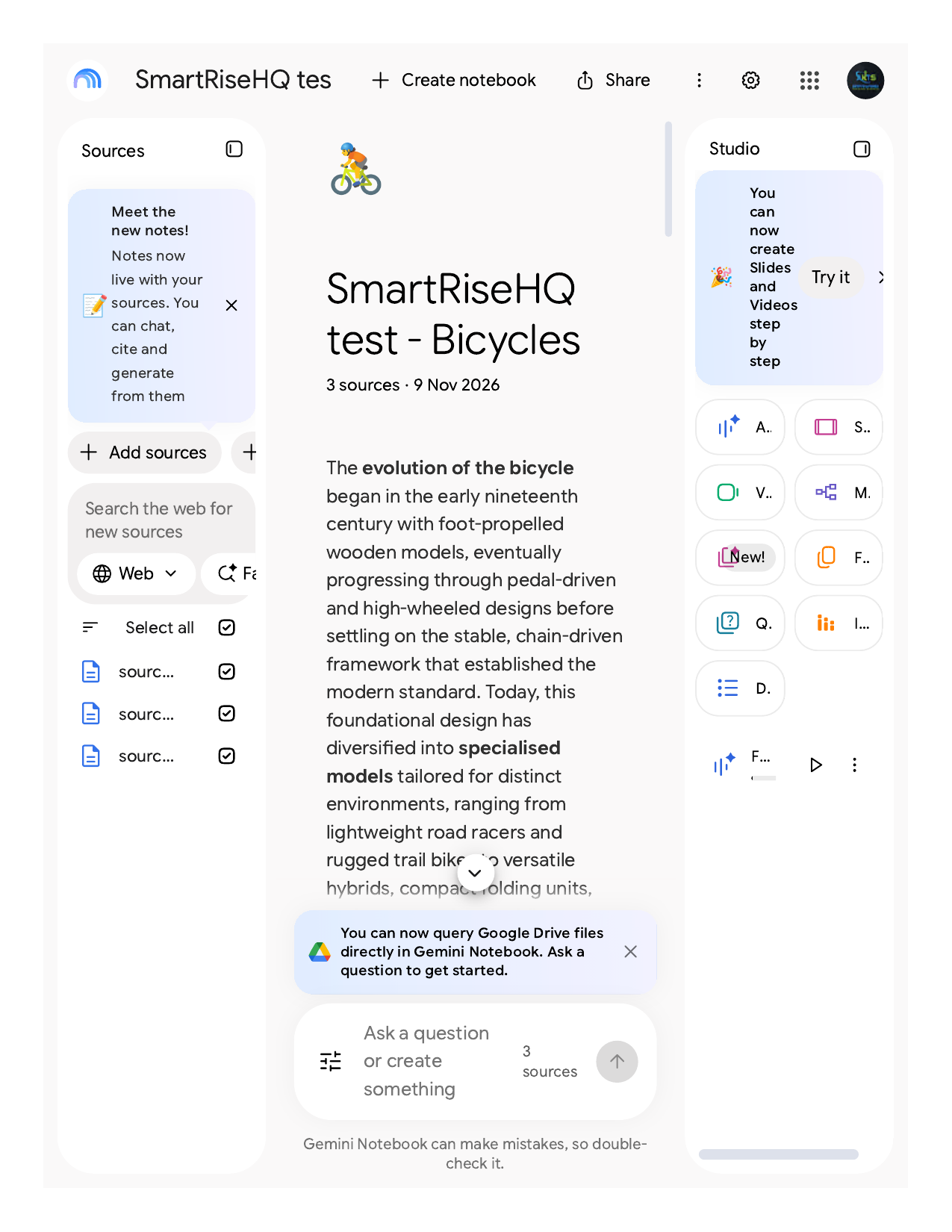
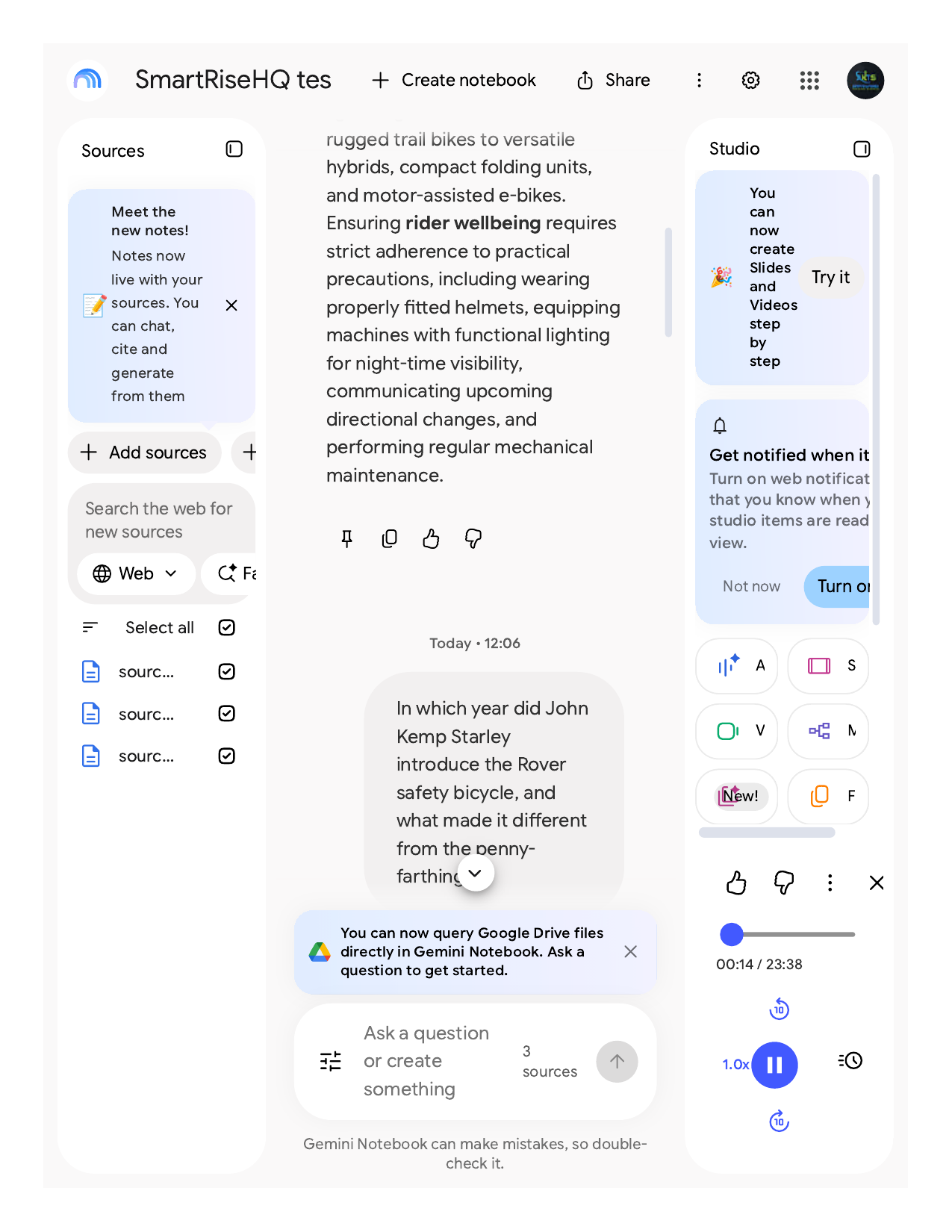
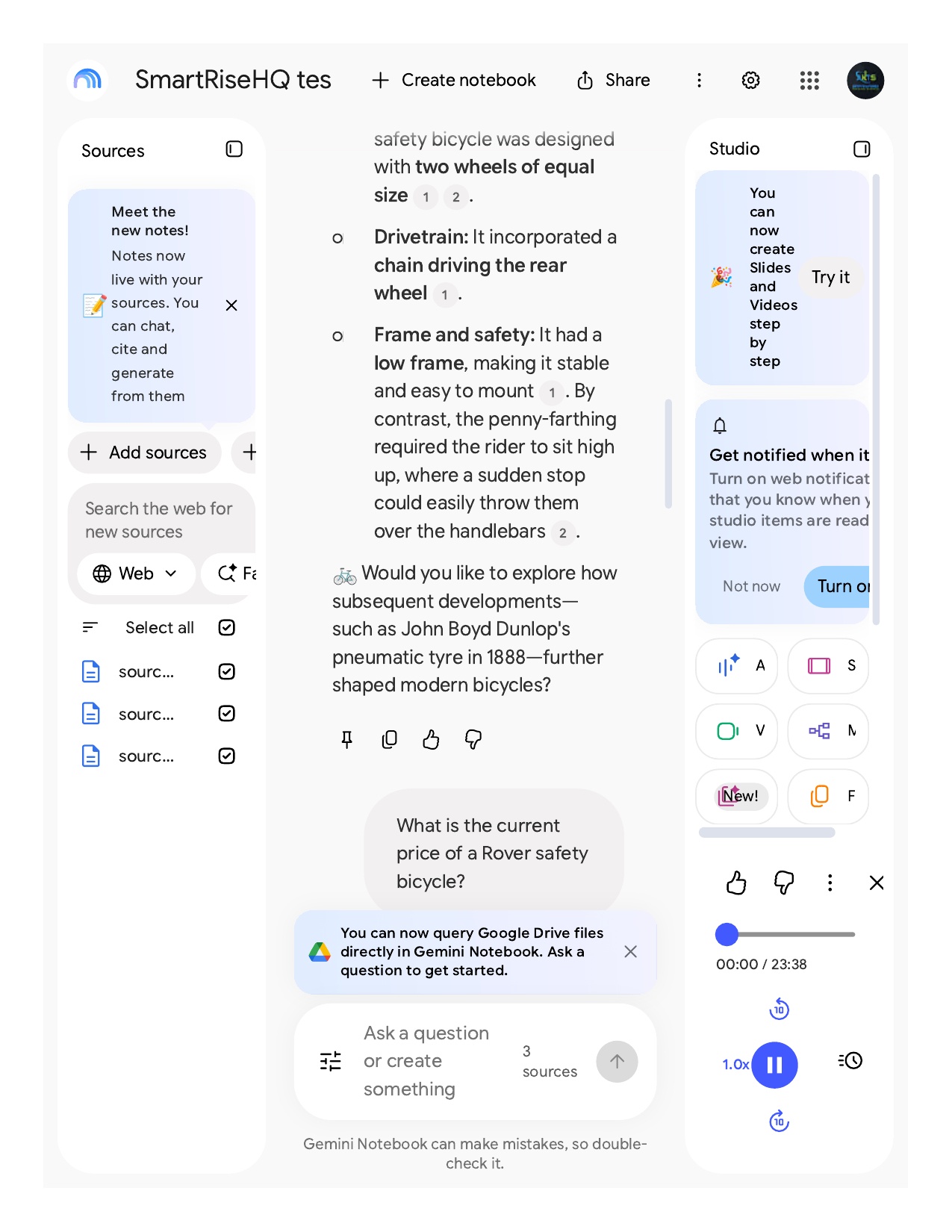
Tested 9 November 2026 on NotebookLM’s free tier. The screenshots are full-page captures from the live test.
HEAD-TO-HEAD COMPARISON
Searching “notebooklm vs claude” usually means one thing: you have a pile of documents and you want to know which AI will actually help you work through them — and whether the free one is enough. The short answer — pick NotebookLM if your job is to understand a fixed set of sources accurately, with every claim pointing back to a passage you can open; pick Claude if your job is to think beyond those sources, argue, synthesise and produce a finished piece of writing or code. They are not really rivals: one is a cited research notebook, the other is a reasoning workbench with a memory folder. This comparison explains the one question that decides between them, the July 2026 rename that confuses every searcher, what each one actually costs — including the fact that NotebookLM has no price of its own — and a 20-minute test you can run on the free tiers to prove the difference to yourself. Every price below was checked on the vendors’ official pages in November 2026, with the verification notes at the bottom of this page.
Updated November 2026 · Editorial comparison
SOURCE-GROUNDED RESEARCH
NotebookLM at a Glance
Google · now called Gemini Notebook
BEST FOR
Anyone who needs answers that come only from their own documents — with a citation on every claim — plus audio overviews, mind maps and study guides generated from those same sources. Free with a Google account.
REASONING & WRITING
Claude at a Glance
Anthropic
BEST FOR
Anyone who needs to reason hard, write long-form drafts, challenge an argument or build with code — organised in Projects that remember your files and your instructions across every chat. Free tier available; Pro is $20 a month.
Verdict · Closed vs open questions · Features · Pricing · 20-minute test · FAQ
NotebookLM in Detail
NotebookLM is Google’s source-grounded research assistant. You create a notebook, add your sources — PDFs, Google Docs and Slides, web pages, public YouTube videos, audio files, images or pasted text — and it answers only from what you gave it. Every response carries inline citations that open the exact passage in the source document, so a claim can be checked in seconds. It will not draw on outside knowledge, will not speculate, and will not answer a question your documents cannot support. That refusal is the product: it is the reason researchers trust it for literature reviews, legal reading, interview prep on a fixed packet and exam revision.
The same notebook also turns your sources into study and review formats through its Studio: Audio Overviews (a two-host “Deep Dive” discussion, a single-speaker Brief, a Critique and a Debate format), Video Overviews, mind maps, flashcards, quizzes, briefing documents, reports and slide decks. A Discover Sources feature can search the web and suggest material to add when you are starting from scratch. On paid Google AI tiers, Deep Research can pull in additional material for you — though the product’s personality stays “closed notebook first”.
The rename you need to know about: on July 16, 2026, Google renamed NotebookLM to Gemini Notebook. It is the same standalone product — Google’s own announcement says so plainly — and existing notebooks, shared links and sources carried over automatically; the old notebooklm.google.com address now redirects to notebook.google.com. The rename also brought a secure cloud computer to each notebook, so Gemini Notebook can write and run code against your uploaded sources for data analysis: live for Google AI Ultra users at the announcement, rolling out to Pro users on the web after that. The tool is also now reachable inside the Gemini app (type @Gemini Notebook), with notebooks coming to Search’s AI Mode. If you search “notebooklm” and land on a page called Gemini Notebook, you are in the right place. This article keeps the NotebookLM name because that is what people search for, and uses Gemini Notebook where the current name matters.
Visit NotebookLM’s official site →
Claude in Detail
Claude is Anthropic’s general-purpose AI assistant, and the honest version of this comparison is NotebookLM versus Claude Projects — because plain Claude chat has no persistent knowledge folder, while Projects are the feature that competes with a notebook. A Project is a persistent workspace with its own chats, a project knowledge base of uploaded files, and custom instructions that apply to every chat inside it. Set the instructions once (“you are my research assistant; answer with risks first; cite file names; flag anything the files do not support”) and they survive every new conversation. On paid plans, project retrieval can search a knowledge base larger than the model’s active context, so a big corpus stays usable.
What Claude does with that material is the opposite of NotebookLM’s discipline. It treats your files as context, then freely combines them with its broad training knowledge and web search to reason, argue, synthesise across domains, draft long-form writing, build Artifacts (code, charts, documents inside the chat), run code, and work with tools through connectors to Google Drive and GitHub. Claude Code — the terminal coding agent — is included on paid plans. The trade-off is that citations are not automatic: you have to ask Claude to quote its sources, and a polished answer can still contain a plausible-sounding detail your files never supported. For anything that must be defended, the evidence trail is your responsibility, not the tool’s.
Visit Claude’s official site →
Our Verdict
An honest editorial take — not sponsored, not influenced by affiliate relationships.
OUR VERDICT
Editorial opinion based on publicly available information and our hands-on NotebookLM test.
Pick by the question you ask, not by the tool you like. If the question is closed — “what do these papers actually say?” — NotebookLM wins, because it cannot answer from anywhere else and every claim is cited. If the question is open — “what should I conclude, and how do I say it well?” — Claude wins, because reasoning and writing are what it is built for. For serious research work, the honest answer is both: NotebookLM builds the evidence set, Claude Projects turns it into the deliverable, and the two together cost about $40 a month on paid plans — or $0 to start, since both free tiers are genuinely usable.
Choose NotebookLM if you need answers that point back to passages (literature review, compliance reading, exam prep on a fixed syllabus), your sources include YouTube or web pages as well as PDFs, or you want audio overviews, mind maps and flashcards without a second app — and your budget is $0.
Choose Claude if the hard part is analysis and production, not retrieval: original writing, cross-domain synthesis, critical pushback on your argument, code or data work, or a fixed “role + house style” that must survive every chat — and you are willing to verify claims yourself.
Choose both if you research and write for a living. Build the evidence set in NotebookLM, export the briefing and key quotes into a Claude Project, draft there, and return to NotebookLM’s source anchors whenever a claim must be defended. The discipline that makes the pair work is never letting a polished Claude draft lose its evidence trail.
Why the verdict holds
The closed/open split is structural, not a feature gap. NotebookLM’s grounding is enforced by design: it has no general-knowledge mode to fall back on, so a question outside your sources gets a refusal, not an invention. Claude’s openness is equally structural: it is a general model with your files as one input among several, so it can always “helpfully” fill a gap from training data. No settings change turns one into the other — NotebookLM cannot write you a 2,000-word argument, and Claude cannot promise it stayed inside your packet. The ranking pages that call this “research vs writing” are describing the same split from the output side; the question you ask is the sharper way to feel it.
The free tiers decide this comparison for most people. NotebookLM’s free tier is most of the product: 100 notebooks, 50 sources per notebook, every Studio format, no card required. Claude’s free tier is a real assistant with up to 5 Projects, but usage is limited every 5 hours and every week, and the 5-project ceiling bites the moment you organise by client or topic. So the $0 answer is NotebookLM for document work, and the $20 answer is Claude Pro for production work — they are not competing for the same dollar.
The paid comparison is a bundle question, not a price war. Claude Pro is a clean $20 a month ($17 on annual billing) for one product. NotebookLM has no standalone price at all: higher limits come bundled into Google AI plans — Plus at $4.99, Pro at $19.99, Ultra at $99.99 or $199.99 a month — which also buy Gemini, storage and other Google AI features. If you already pay for Google AI Pro, NotebookLM’s higher limits cost you nothing extra; if you already pay for Claude Pro, Projects cost you nothing extra. The interesting money decision is Pro-vs-Pro at about $20, not free-vs-free — and for many people the incremental cost of the second tool is zero.
Who should pick which
- Students revising from a fixed syllabus: NotebookLM free — upload the textbook, lecture notes and reading list, quiz yourself with flashcards, and listen to an Audio Overview on the walk to class. $0, no card.
- Researchers doing a literature review: NotebookLM for the evidence (cited, per-passage), Claude Projects for the write-up — the dual workflow, not a single pick.
- Writers, analysts and consultants producing deliverables: Claude Pro — Projects hold the client corpus and the house style; Artifacts and code execution turn analysis into something you can ship.
- Lawyers and compliance readers: NotebookLM — source traceability is non-negotiable here, and a refusal beats a confident invention.
- Teams sharing a knowledge base: Claude Team/Enterprise for shared projects with edit/use permissions; or Google Workspace paths for shared notebooks — check the permission model before uploading anything regulated, on either tool.
- Anyone on a $0 budget: NotebookLM — the free tier is the full research product, while Claude Free is a capped taste of the paid one.
Pick by the Question You Ask
This is the section the ranking pages skip, and it is the fastest way to decide. Take the actual question you need answered and sort it into one of two buckets before you open either tool.
Closed questions have their answer inside a defined set of sources: “which papers challenge the 2019 Jensen findings?”, “what does the contract say about termination?”, “what did the lecturer say about X in week 6?” NotebookLM is built for these. It selects the sources, answers from them, and cites the passage. Ask it a question the sources cannot answer and it says so — which is the correct behaviour, however unsatisfying it feels.
Open questions need judgement beyond any single source set: “what is the strongest objection to this plan?”, “how do behavioural economics principles apply to onboarding?”, “draft the proposal in our voice”. Claude is built for these. It reasons across domains, challenges assumptions, synthesises, and produces polished long-form output. NotebookLM cannot do this work well — it summarises rather than argues, and its writing output is basic.
Most real projects contain both kinds of question, which is why the “use both” advice keeps appearing — but it appears without the sequencing that makes it work. The sequence is: Claude first for orientation (understand the landscape, decide which sources matter), NotebookLM second for the evidence (extract claims with citations), Claude third for the deliverable (argue, draft, polish). Run it in that order and each tool does the job it is built for; run it backwards and you will spend the day copy-pasting between tabs, which is the friction the MCP connection and the manual handoff both exist to remove.
What $20 a Month Actually Buys You
Sticker prices — $20 for Claude Pro, $19.99 for Google AI Pro — look like a tie. They are not, because they buy different things. Claude Pro buys one product, deeper: unlimited Projects, more usage (at least 5x Free per 5-hour session, per Anthropic’s own FAQ), Research, Claude Code, more models, and the full Claude app bundle. Google AI Pro buys a bundle, wider: NotebookLM’s higher limits (500 notebooks, 300 sources each) plus the Gemini app, more storage and other Google AI features. Worked through three concrete monthly jobs, the difference is plain.
Job 1: one literature review a month (25 papers). NotebookLM free handles it: 25 sources fits inside the 50-source free cap, with citations on every answer and an Audio Overview for the commute. Cost: $0. Claude Free can also hold the papers in a Project, but without automatic citation you verify every claim by hand — which is the whole job, done slowly. NotebookLM wins this job at $0.
Job 2: a client report every week from the same corpus. This is Claude Pro’s job: one Project holds the corpus and the instructions (“answer with risks first, cite file names”), and every week’s draft inherits both. Cost: $20 a month. NotebookLM can supply the cited evidence, but it cannot produce the report — you would still be writing it yourself. Claude wins this job at $20.
Job 3: both jobs, every month. NotebookLM Pro limits plus Claude Pro: $19.99 + $20 = about $40 a month (or $37 on Claude’s annual billing). That is the dual-stack price, and it is the honest answer for anyone who researches and writes for a living. Note the bundle trap in reverse: if you already pay for Google AI Pro for Gemini, NotebookLM’s higher limits are already included — your incremental cost for the research half is $0, and the dual-stack is just Claude Pro’s $20. The same applies the other way round: if you already pay Claude Pro for coding and chat, Projects are already included.
The free-tier warning that matters: NotebookLM’s free limits are generous but real — 50 sources per notebook forces you to split a large literature review across notebooks, and notebooks are silos you cannot query together. Claude’s free limits are tighter in a different way — 5 Projects and usage caps that bite mid-deadline on long sessions. Know which wall you will hit before you build a workflow against it.
Try Both in 20 Minutes (Free Tiers)
No ranking page gives you a way to test the claim yourself, so here is one. Take three papers you already know well — include one pair with conflicting findings and one with a dense methods section or a chart — and add the same three files to a NotebookLM notebook and to a Claude Project. Then ask both tools the same four questions and judge the answers on three things: does the claim trace back to the file, do caveats and disagreements survive, and how much cleanup does the draft need before you can use it?
1. Find a specific claim: ask each tool to identify one result and its supporting passage. In NotebookLM, open the cited passage and check it supports the wording and the numbers. In Claude, ask it to quote the file and check the same thing. A citation that merely points at a related paper is a failure, even if it looks tidy.
2. Explain a dense passage: ask each tool to explain the method and quote the key sentence. Check whether the explanation preserves the paper’s assumptions and limits, or smooths them away.
3. Compare across sources: ask where the papers agree and disagree. Check that each paper’s contribution stays separate — merged claims are the most common failure in both tools, and the hardest to spot.
4. Draft a cited paragraph: ask each tool to write one literature-review paragraph with source references. Then check whether the claims are still traceable after the wording changes. NotebookLM’s paragraph will be plainer and better grounded; Claude’s will read better and need more verification. That trade-off, felt once on your own papers, is the whole comparison.
Repeat any failed question with the sources named explicitly — sometimes the problem is a missing file, not a weak tool. And ask one question the sources cannot answer: NotebookLM should admit the gap, while Claude may produce a convincing explanation of a missing result. That answer is the most informative one in the whole test.
Switching Costs: What You Leave Behind
Only one ranking page touches this, and it deserves a full section, because the lock-in here is real and different on each side. A NotebookLM notebook is a silo: you cannot query across all your notebooks at once, and there is no export that turns a notebook — sources, citations, Studio outputs and all — into a Claude Project. A Claude Project is equally sticky in the other direction: the project instructions, the organised knowledge base and the chat history that give a Project its value do not transfer into NotebookLM. Switching tools means rebuilding the corpus and the context by hand.
Two practical consequences. First, the free tier is the time to test, because the corpus you build on the free tier is the one you keep — run the 20-minute test above with your real papers before you organise a year of research in either tool. Second, if you think you might need both, start both now rather than migrating later: a NotebookLM notebook and a Claude Project for the same corpus cost $0 to set up, and the $40-a-month dual-stack is cheaper than one migration. And a privacy note that applies to both: neither tool is private local software — both are cloud products with account-level privacy policies, so read the Workspace-versus-consumer rules on Google’s side and check Claude’s training opt-out on yours before uploading regulated or sensitive material.
Feature Snapshot
Side-by-side facts drawn from publicly available product information.
| FEATURE | NotebookLM (Gemini Notebook) | Claude (Projects) |
|---|---|---|
| CORE APPROACH | Source-grounded notebook Answers only from the sources you select, with a citation on every claim. |
General assistant + persistent Projects Reasoning, writing and code, with project knowledge and instructions that persist across chats. |
| WORKS WITHOUT UPLOADS | No — needs sources to answer | Yes — broad knowledge + web search |
| CITATIONS | Automatic, inline, to the exact passage | Only when asked; quote-and-check is manual |
| SOURCE TYPES | PDF, Docs/Slides, web URLs, public YouTube, audio, images, pasted text | Uploaded files (PDF, DOCX, CSV, TXT, HTML, EPUB, images); Drive/GitHub connectors |
| SOURCE CAPACITY (FREE) | 100 notebooks; 50 sources each; up to 500,000 words or 200 MB per source | Up to 5 Projects; context window up to 1M tokens (varies by model) |
| STUDIO / OUTPUT FORMATS | Audio/Video Overviews, mind maps, flashcards, quizzes, briefing docs, reports, slide decks | Artifacts (code, charts, documents), file creation/editing, code execution |
| AUDIO OVERVIEWS | Yes — podcast-style, two-host Deep Dive and other formats | No equivalent |
| CUSTOM INSTRUCTIONS | Chat styles / Learning Guide; not a full project constitution | Project instructions apply to every chat in the Project |
| LONG-FORM WRITING | Basic — summaries and answers, not polished drafts | Excellent — reports, essays, proposals in your voice |
| CODE & DATA | Secure cloud computer per notebook (Ultra live; Pro rollout) for code grounded in sources | Code execution, Claude Code on paid plans, file tools |
| HALLUCINATION RISK | Very low within uploaded sources; can still misread a passage | Low but real when reasoning beyond sources; plausible details need checking |
| TEAM SHARING | Shared notebooks; Workspace/Enterprise paths with admin controls | Shared Projects on Team/Enterprise, with edit/use permissions |
| SIGNATURE STRENGTH | Cited answers + Studio outputs Nothing leaves the source set; listen, quiz and review from the same notebook. |
Reasoning + production Persistent instructions and knowledge turn a chat into a workspace. |
Pricing & Free Options
Plans change often — always confirm on the official site before buying. Prices verified on the official pages in November 2026; see the pricing note below for exactly what was re-read today.
NotebookLM (Gemini Notebook)
From $0 free, then Google AI plans $4.99–$199.99/mo
- Standard: $0 with a Google account, 100 notebooks, 50 sources each
- Google AI Plus: $4.99/mo, 200 notebooks, 100 sources each
- Google AI Pro: $19.99/mo, 500 notebooks, 300 sources each
- Google AI Ultra: $99.99 or $199.99/mo, 500 notebooks, 500 or 600 sources each
- Note: no standalone NotebookLM subscription — limits ride Google AI plans
Claude
From $0 free, then $20–$200/mo
- Free: $0, limited usage, up to 5 Projects
- Pro: $20/mo ($17/mo annual, $200 billed up front), unlimited Projects
- Max: $100/mo, 5x Pro usage, $100/mo API credits
- Ultra: $200/mo, 10x Pro weekly usage, no 5-hour limit, $200/mo API credits
- Enterprise: $20/seat/mo + usage, annual billing
What the free plan includes — and where it stops
| TOOL | FREE INCLUDES | WHERE IT STOPS |
|---|---|---|
| NotebookLM Standard | 100 notebooks, 50 sources per notebook, up to 500,000 words or 200 MB per source, every Studio format (Audio/Video Overviews, mind maps, flashcards, quizzes, reports, slide decks); no card required | Compute-based usage limits (refresh every 5 hours up to a weekly limit); 50-source cap forces splitting large corpora; notebooks cannot be queried together |
| Claude Free | Chat on web, desktop and mobile; web search; Artifacts; file creation and code execution; Memory; connectors; up to 5 Projects | Limited usage every 5 hours and every week; 5-Project ceiling; no Research, Claude Code or priority access — those need a paid plan |
Strengths & Trade-offs
NotebookLM
✅ Every answer cited to the exact passage — the lowest hallucination risk in this comparison
✅ Free tier is most of the product: 100 notebooks, 50 sources each, all Studio formats, $0
✅ Audio/Video Overviews, mind maps, flashcards and quizzes no other tool in this comparison offers
❌ Cannot work without sources, cannot reason beyond them, and its writing output is basic — you still need another tool for the deliverable
Claude
✅ Projects remember your files and instructions across every chat — a real workspace, not a fresh start each time
✅ Best writing, reasoning and code in this comparison, with Artifacts and Claude Code on paid plans
✅ Clean $20 Pro price with annual discount; usage limits are published, not hidden
❌ No automatic citations — the evidence trail is your job — and the free tier’s 5-Project cap and usage limits bite mid-deadline
What About Buying Both?
Most ranking pages suggest using both tools without pricing it. Here is the priced version. Google AI Pro ($19.99 a month) plus Claude Pro ($20 a month, or $17 on annual billing) costs about $40 a month on monthly billing, or about $37 a month with Claude on annual billing. That is less than Claude Max alone at $100 a month — and the dual-stack does two jobs no single plan can: it keeps your work grounded in cited sources (NotebookLM) and turns it into finished writing and code (Claude).
When the dual-stack wins: you research and write every week, and neither job is small enough to ignore. When it loses: you only do one of the two jobs — then one $0 free tier or one $20 plan is the cheaper answer, and the second subscription is waste. And when neither cheap plan is enough — over 300 sources per notebook, or Claude sessions that exhaust Pro’s weekly caps — the next step is Google AI Ultra or Claude Max, not a second cheap plan. Remember the bundle check first: if you already pay for Google AI Pro, NotebookLM’s higher limits are included, and if you already pay for Claude Pro, Projects are included — for many people the second half of the stack costs $0.
Bottom Line
If your question is closed — the answer lives inside a set of sources you can name — use NotebookLM: it is free, it cites everything, and it turns those sources into audio, maps and quizzes without a second app. If your question is open — you need to reason, argue or write something new — pay $20 a month for Claude Pro and organise the work in Projects, where your files and instructions persist. If you do both jobs every week, run both: about $40 a month for the pair, $0 to start, and a 20-minute test on your own papers will tell you more than any comparison page can — including this one. Just remember the rename: the tool you are looking for is now called Gemini Notebook, at notebook.google.com, and the old NotebookLM name still works as a search term.
Frequently Asked Questions
Is NotebookLM now called Gemini Notebook?
Yes. Google renamed NotebookLM to Gemini Notebook on July 16, 2026. It is the same standalone product — existing notebooks, shared links and sources carried over automatically, and notebooklm.google.com redirects to notebook.google.com. The rename also added a secure cloud computer to each notebook for running code against your sources. People still search for “NotebookLM”, so both names refer to the same tool.
Which is better for academic research, NotebookLM or Claude?
For the research half — reading papers, comparing findings, checking claims — NotebookLM, because every answer is cited to the exact passage and it refuses questions the sources cannot answer. For the writing half — turning that research into a paper, proposal or thesis chapter — Claude, because its long-form writing and reasoning are far stronger. Serious researchers use both in sequence: NotebookLM for the evidence, Claude Projects for the draft.
Is NotebookLM free?
Yes. NotebookLM (Gemini Notebook) is free with a Google account: 100 notebooks, 50 sources per notebook, and every Studio format including Audio Overviews. There is no standalone paid NotebookLM plan — higher limits come through Google AI plans: Plus at $4.99, Pro at $19.99, and Ultra at $99.99 or $199.99 a month. Usage on the free tier is compute-based and refreshes every 5 hours up to a weekly limit.
Can Claude replace NotebookLM for document analysis?
For small document sets where citation is less critical, yes — Claude Projects can hold the files and reason over them. For large sets where every claim must be traceable to a passage, no: Claude does not cite automatically, so you verify every claim by hand, which is the whole job done slowly. NotebookLM’s grounded design is the more reliable choice there.
Does NotebookLM hallucinate?
Far less than a general chatbot on document questions, because it cannot make claims from outside your source set — it answers only from what you uploaded. It can still misread or misinterpret a passage, and its summaries can flatten caveats, so open the cited passage before you quote a claim. A citation that points at a related paper rather than a supporting passage is a failure, not a pass.
Can I use NotebookLM and Claude together?
Yes, and it is the recommended workflow: build the evidence set in NotebookLM, copy the briefing and key quotes into a Claude Project, draft there, and return to NotebookLM’s source anchors whenever a claim must be defended. Power users also connect the two with an MCP server so Claude can query NotebookLM notebooks directly, but the manual handoff works fine and takes no setup.
Keep comparing
- Claude vs Perplexity — making things versus finding things, for the research behind your reading.
- Claude vs Gemini — the two AI assistants head-to-head on pricing, free tiers and which to pick.
- ChatGPT vs Claude — the other big chatbot comparison, for when the choice is between assistants rather than notebooks.
How we compare
SmartRiseHQ comparisons are research-based unless a page says otherwise — this page includes a hands-on NotebookLM test (see above). Prices and plan limits come from the vendors’ official pricing pages, checked in the month stated at the top of the page. We ran a hands-on test of NotebookLM for this comparison (see the Hands-on test section above); Claude was not tested hands-on because no Claude account could be created. We do not accept sponsored placements, and we do not use affiliate or referral links. Where a figure could not be re-read directly on the day — as with Google’s NotebookLM plan prices and limits this month, which sit behind a Google sign-in — the pricing note below says so plainly instead of presenting a corroborated figure as freshly read.
A note on pricing
Prices were checked in November 2026. Claude’s full ladder — Free $0 (up to 5 Projects), Pro $20 a month ($17 annual, $200 billed up front), Max $100 a month (5x Pro usage), Ultra $200 a month (10x Pro weekly usage, no 5-hour limit for verified accounts), Enterprise $20 per seat per month plus usage — was read directly on Anthropic’s official pricing page (claude.com/pricing) on 2026-11-09, including the up-to-1M-token context window. The rename — NotebookLM to Gemini Notebook, July 16, 2026 — was read directly on Google’s official blog the same day. Google AI plan prices and NotebookLM limits (Standard 100 notebooks / 50 sources; Plus $4.99, 200/100; Pro $19.99, 500/300; Ultra $99.99/$199.99, 500/500 or 600; 500,000 words or 200 MB per source; compute-based usage limits refreshing every 5 hours) could NOT be re-read directly this run because Google’s plans page requires sign-in; they rest on four independent sources that cross-checked Google’s own plan and help pages between October 15 and November 5, 2026, and are labelled as corroborated, not freshly read. The NotebookLM daily quota figures sometimes quoted elsewhere (50 chats, 3 Audio/Video Overviews a day) are from the same corroborated tables and are not asserted in this article. Claude’s 30 MB project-knowledge file cap is an Anthropic support figure via third-party corroboration. All prices are in US dollars before tax unless stated, and vendors change plans without notice.