Review method: Research-based, with one hands-on task test (13 Oct 2026). This review is based on in-depth research of official documentation, pricing pages, user reviews, and expert analyses. One real task was also tested hands-on in a ChatGPT Plus account on 13 October 2026 — see the Ease of use section..
The best all-round AI assistant for most people — strong at writing, brainstorming, research and coding help, with a genuinely usable free tier.
Best for: Most people getting started with AI
Research-based editorial score — features, pricing and documented limitations weighed for the audience above, per our review methodology.
ChatGPT is the versatile AI assistant most people start with — writing, research, coding help, and custom GPTs. Here is what the free tier covers, where paid plans add value, and what to watch out for.

Table of Contents
Key Takeaways
- ChatGPT is the best starting point for most people new to AI assistants: writing, brainstorming, research, and coding help in one place.
- The free tier is genuinely usable for everyday questions and drafts; the $20/month Plus plan is the sweet spot for regular users who hit free-tier limits.
- Custom GPTs, Projects, voice conversations, and file/image analysis extend it well beyond a basic chatbot.
- It can state wrong answers with complete confidence — verify facts, citations, and figures independently.
- Free and lower tiers have usage caps, and business data pasted into chats raises privacy questions — keep sensitive client data out.
- It is a generalist: specialized tools like Semrush for SEO or Jasper for structured marketing copy beat it in their own niches.
What ChatGPT is and who it’s for
ChatGPT is OpenAI’s conversational AI assistant — the product that made generative AI a household name. You type a question, a request, or a half-formed idea into a chat box, and it responds in natural language: drafting paragraphs, explaining concepts, summarizing documents, brainstorming lists, walking through code, and generally acting as an on-demand thought partner.
Under the hood it is a large language model — software trained on vast amounts of text that predicts helpful responses. What makes it useful in practice is the breadth: unlike a tool built for one job, ChatGPT handles an enormous range of tasks at least competently. Writers use it for first drafts and rewrites. Students use it as a study aid. Developers use it to debug code and explain unfamiliar libraries. Marketers use it for headlines, outlines, and campaign ideas. Small business owners use it to draft emails, policies, product descriptions, and FAQ pages.
The honest positioning: ChatGPT is the general-purpose starting point. If you don’t yet know which AI tool fits your workflow, this is where you begin — and for many people, it is also where they stay. The free tier covers everyday use, and the paid tiers raise the ceiling for people who use it daily.
Key features
ChatGPT’s feature set is broad because the product itself is broad. These are the capabilities that matter most in everyday use:
Conversational writing help
Drafting is ChatGPT’s home turf. It can produce emails, blog outlines, social captions, scripts, product descriptions, cover letters, and ad copy — and, more valuably, revise them. Paste your draft and ask it to tighten the intro, cut jargon, or rewrite for a different audience. The back-and-forth conversation format is the real advantage: you iterate in natural language instead of filling out forms. That said, output quality depends heavily on what you feed it. Vague prompts get generic prose; specific briefs with audience, tone, and examples get genuinely usable drafts. This is where our free AI prompt generator pays off.
Research and summarization
ChatGPT can summarize long documents you paste or upload, explain dense topics at whatever level you ask for (“explain this like I’m a beginner”), compare options in tables, and synthesize notes into action items. Paid tiers add web browsing and a Deep Research mode that works through multi-step questions. The critical caveat: it can invent facts, quotes, and citations. Treat its research as a starting scaffold, then verify anything load-bearing against primary sources.
Coding assistance
Developers and dabblers alike use ChatGPT to explain code, find bugs, convert snippets between languages, and generate boilerplate. It is also the gateway to Codex — OpenAI’s agentic coding tooling that goes beyond the chat window into editors and cloud tasks, with deeper access on the Plus and Pro tiers. It won’t replace a developer, but it meaningfully speeds up routine work and lowers the barrier for non-developers automating small tasks.
For coding specifically, our ChatGPT vs GitHub Copilot comparison looks at how the two compare for developers.
Custom GPTs
Custom GPTs let you (or someone else) package instructions, files, and behaviors into a purpose-built assistant — a study coach for a specific exam, a style-guide-aware blog editor, a recipe planner. You build one by describing what it should do in plain language; no code required. The GPT Store also lets you browse ones others have made. For individuals and small teams, this is the closest thing to having a specialized tool without building one.
Voice and image inputs
ChatGPT accepts more than text. Voice mode turns it into a spoken conversation — useful for thinking out loud, language practice, or getting quick answers hands-free. Image input lets you upload a photo or screenshot and ask about it: transcribe a whiteboard, identify what’s in a diagram, get feedback on a design, or ask why your plant is dying. Availability and limits vary by plan, with paid tiers getting more generous access.
Memory and Projects
ChatGPT can remember context across conversations — your preferences, ongoing projects, how you like things formatted — so you spend less time re-explaining yourself. Projects let you organize related chats and files around one goal, like a book manuscript or a product launch. Useful, yes — and also worth knowing about if you care about what the tool retains about you, which we cover in Limitations.
Ease of use
ChatGPT is one of the easiest AI tools to start with, and that’s a big part of its success. There’s no onboarding course: open the app, type a question, get an answer. The conversational interface is self-explanatory, and the mobile and desktop apps keep it a tap away everywhere you work. New users become productive within minutes, not days.


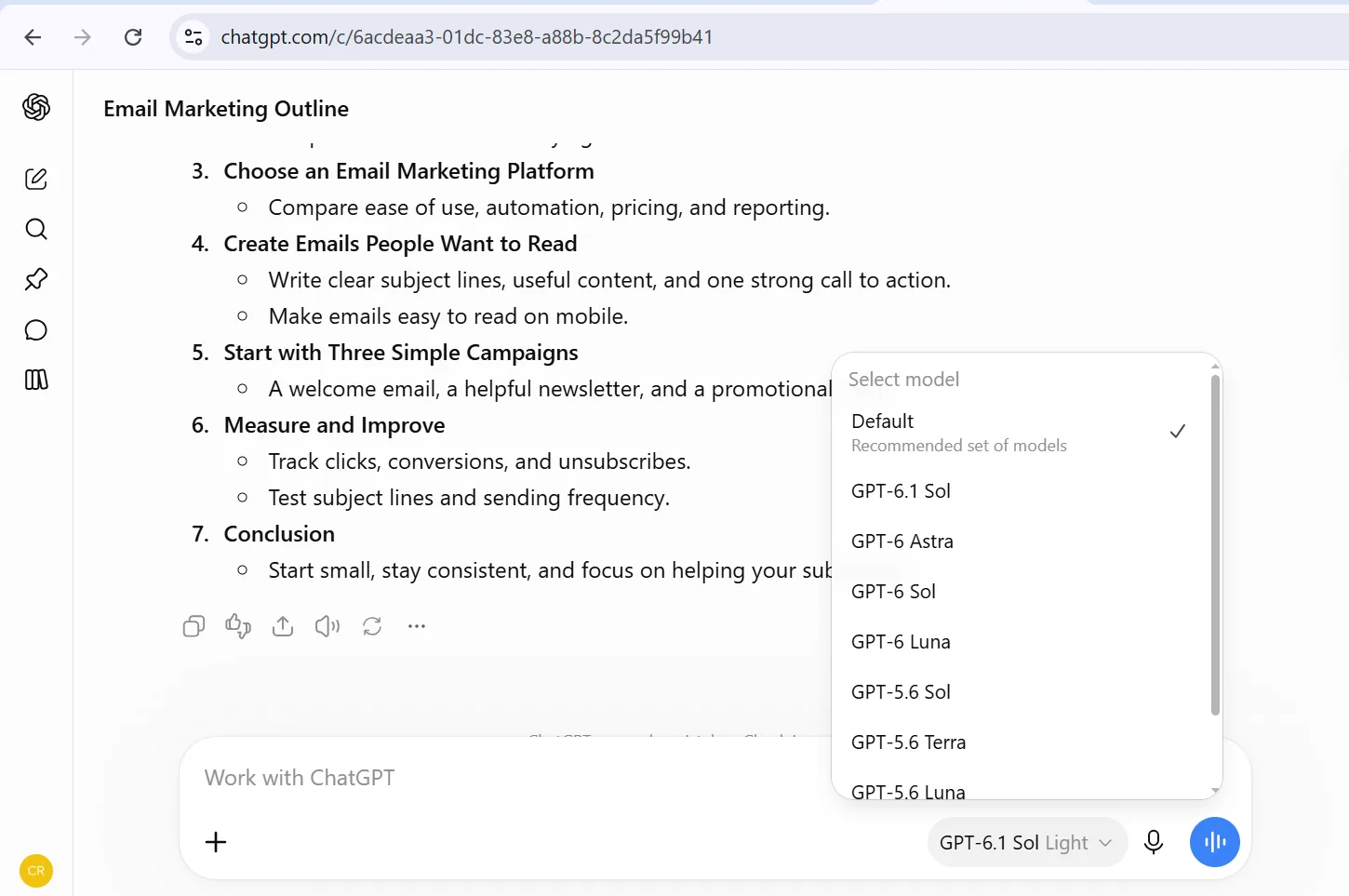
Hands-on test — 13 October 2026: We ran one real task in a ChatGPT Plus account: a blog-outline prompt for an email-marketing post (screenshots above). The rest of this review remains research-based on official documentation and pricing pages.
Hands-on test — 3 November 2026: We asked ChatGPT (Free plan) to create a complete blog outline with 7 sections about how small businesses can use AI tools to save time. It returned a full 7-section outline — Introduction, Automate Everyday Administrative Tasks, Improve Marketing and Content Creation With AI, Save Time With AI-Powered Customer Support, Simplify Sales, Lead Generation, and Customer Management, Use AI for Business Planning, Research, and Decision-Making, and How to Start Using AI Tools in Your Small Business.
Download the full outline (PDF)
The learning curve isn’t in the interface — it’s in prompting. The difference between a mediocre answer and an excellent one is almost always the quality of the ask: context, constraints, examples, and a clear definition of done. Custom GPTs, Projects, and the agentic features (Deep Research, Agent mode) add some conceptual overhead, but the core experience stays simple. If you can hold a conversation, you can use ChatGPT; getting great results takes the same skill as delegating well to a smart assistant.
Pricing & plans
ChatGPT’s lineup has grown beyond the simple free-versus-Plus split. Here is the current structure, with prices as listed around September 2026 — OpenAI adjusts tiers regularly, so confirm current pricing on the official pricing page before you commit.
| Plan | Price | Best for |
|---|---|---|
| Free | $0 | Casual users exploring what AI can do; everyday questions and short drafts. |
| Go | Around $8/month (checked October 2026 — confirm on the official site) | Longer conversations and higher limits than free on a budget. |
| Plus | Around $20/month (checked October 2026 — confirm on the official site) | Regular users who want the newest models, higher limits, and extras like image generation and voice mode. |
| Pro | Pro 100 at $100/month, Pro 200 at $200/month, and Pro 500 at $500/month (includes Ultrafast); billed monthly only (checked October 2026 — confirm on the official site) | Power users, researchers, and developers who need maximum usage and the top reasoning models. |
| Business | Around $25/user/month billed monthly, or $20/user/month billed annually, minimum 2 seats (checked October 2026 — confirm on the official site) | Teams that need admin controls, shared workspaces, and data excluded from training by default. |
| Enterprise | Custom pricing — contact sales | Large organizations needing SSO, advanced security, and custom data policies. |
The free tier is genuinely functional: it handles everyday questions, writing help, and light research with limited access to the newer models. Go is the budget step up — higher limits than free at a low price, launched globally in early 2026. Plus remains the sweet spot for most individuals: around $20/month for priority access, the flagship models, image generation, file uploads, voice mode, custom GPTs, and data analysis.
Pro splits into three tiers — Pro 100 ($100/month), Pro 200 ($200/month), and Pro 500 ($500/month, includes Ultrafast) — for people who run research and coding workloads all day. Pro is billed monthly; annual billing is not available. For teams, Business (formerly Team) adds a workspace, admin controls, and training-data exclusion by default; Enterprise is a custom quote for larger organizations. As always with OpenAI, the exact limits and features per tier move around, so treat the table above as a snapshot and check the official pricing page for current details.
Strengths
- Versatility. One subscription covers writing, research, coding, planning, brainstorming, and everyday questions. Few tools match the breadth.
- Genuinely good free tier. You can get real work done without paying, which makes it the natural first AI tool for most people.
- Conversational iteration. The chat format makes refining output effortless — “make it shorter,” “more formal,” “try three alternatives” — no forms, no settings to learn.
- Multimodal inputs. Text, voice, images, and files all feed into the same assistant, which suits real-world messy workflows.
- Custom GPTs and integrations. Extend it into a specialized assistant or connect it to your stack without code.
- Ecosystem and momentum. As the biggest name in AI assistants, it gets new features first and has the largest library of tutorials, integrations, and community-built GPTs.
Limitations
No honest review skips these. ChatGPT is powerful, but the failure modes are real and worth knowing before you rely on it.
- Hallucinations. ChatGPT can state false facts, invent quotes, and fabricate citations with complete confidence. Never trust a specific claim, statistic, or reference without independent verification — especially in legal, medical, financial, or published content.
- Knowledge limits. The model behind ChatGPT has a training cutoff that varies by model version, and while browsing can fill gaps, the tool doesn’t always flag when its knowledge is stale. Check the official site for current cutoff details.
- Usage caps. Free and lower tiers throttle you: limited messages, uploads, and image generations per period, with the newest models reserved for paid plans. Heavy daily users will feel the ceiling quickly on free.
- Privacy considerations. What you paste into a chat may be used to improve the model unless you opt out, and business plans excluded from training cost money. Keep client data, proprietary code, trade secrets, and personal identifiers out of consumer-tier chats — or use Business/Enterprise with the right settings.
- Memory trade-offs. The convenience of ChatGPT remembering your preferences comes with a record of what it knows; review and clear stored memory periodically if that concerns you.
- Jack of all trades. Specialized tools beat it in their niches: Jasper and Copy.ai structure marketing workflows better, Writesonic bakes in SEO checks, Semrush owns SEO data, and Canva is the better design environment.
- Design is not its job. It can generate or describe images, but for real visual work you’ll want a design tool, not a chatbot.
Who should use it — and who should skip it
ChatGPT is an easy yes for: students and professionals who want a general-purpose thought partner; writers who need drafting and editing help; developers who want faster debugging and boilerplate; small business owners drafting content, emails, and policies; and anyone curious about AI who wants the best free starting point.
Think twice — or at least add guardrails — if: your work demands verifiable accuracy (law, medicine, finance, published journalism); you handle sensitive client or customer data and can’t justify a Business or Enterprise plan; you need structured, repeatable marketing output where a specialized tool like Jasper or Copy.ai would serve you better; or you’re a designer, where Canva or a dedicated image tool is the right home. ChatGPT rewards well-structured input; if you want a tool that guides you through SEO checklists or brand templates on its own, pick the specialist.
How it compares to alternatives
The closest head-to-head is Claude, Anthropic’s assistant — the two trade blows on writing quality, reasoning, and coding, with real differences in style and strengths. Our full breakdown lives here: ChatGPT vs Claude.
Beyond Claude: Google’s Gemini is the natural choice if you live in Google Workspace; Microsoft Copilot is the default for Microsoft 365 shops. For writing specifically, Jasper targets marketing teams with brand voice and campaign workflows, Copy.ai leans into marketing and sales automation, and Writesonic combines writing with built-in SEO features. For research and data, Semrush is the SEO toolkit ChatGPT can’t replace, and for anything visual, Canva wins. The pattern: ChatGPT is the generalist baseline; specialists win when one job dominates your week.
Verdict
ChatGPT remains the most versatile AI assistant you can start with — and for most people, the right one. The free tier handles everyday tasks without costing a cent, and Plus at around $20/month is fair value for anyone who uses it daily. Custom GPTs, voice and image inputs, and a huge ecosystem make it more than a chatbot; it’s a genuinely useful work surface.
The asterisk is the same one that hangs over every large language model: it can be confidently wrong, so verify anything important. Treat it as a brilliant, tireless junior assistant — great for drafts, brainstorming, and research scaffolding — and keep the final judgment, the sensitive data, and the specialist jobs for the right human or the right tool. If you only adopt one AI product this year, this is the safest bet.
FAQ
Is ChatGPT really free?
Yes — the free tier costs nothing and covers everyday questions, writing help, and light research, with limited access to the newer models and capped messages, uploads, and image generations. Paid plans (Go at around $8/month, Plus at around $20/month — checked October 2026, confirm on the official site) raise those limits and unlock the flagship models and extra features.
Which ChatGPT plan should I get?
Start free — it’s genuinely usable. Upgrade to Go if you mostly want higher limits on a budget. Pick Plus if you use ChatGPT daily and want the newest models, image generation, voice mode, custom GPTs, and file analysis. Pro’s higher tiers are for power users running heavy research or coding workloads. Teams should look at Business for admin controls and training-data exclusion.
Can ChatGPT be trusted for factual research?
Not blindly. ChatGPT can produce confident-sounding errors, invented quotes, and fake citations — a behavior often called hallucination. Use it to explore a topic, draft an outline, or summarize sources you provide, then verify specific claims, statistics, and references against primary sources before publishing or acting on them.
Is it safe to paste business data into ChatGPT?
Be cautious. Content in consumer-tier chats may be used to improve models unless you opt out, so keep client data, proprietary code, trade secrets, and personal identifiers out of free, Go, and Plus chats. Business and Enterprise plans exclude your data from training by default — that’s one of the main reasons teams pay for them.
What’s the difference between ChatGPT and Claude?
They’re the two leading general-purpose AI assistants, and the honest answer is that each has strengths depending on the task — writing style, reasoning, coding, and ecosystem all differ. We’ve compared them head to head, with an editorial verdict, in ChatGPT vs Claude.
Do I still need specialized tools if I have ChatGPT?
Often, yes. ChatGPT is a generalist: for SEO data and audits, Semrush is in another league; for structured brand-voice marketing copy, Jasper is purpose-built; for design, Canva wins. Use ChatGPT as your baseline and add a specialist where one job dominates your week.
Get better answers from any AI
ChatGPT rewards well-structured prompts. Build yours with our free generator, then see how it stacks up against Claude.